OLED vs. Mini-LED: Monitor Backlight Technology Explained
OLED and Mini-LED are the two technologies fighting over the top of the monitor market right now, and they solve the same problem — weak contrast and washed-out blacks on traditional LCD panels — in fundamentally different ways. Confusingly, both get marketed with the same buzzwords: "deep blacks," "HDR," "next-generation." But an OLED self-emissive panel and a Mini-LED local dimming backlight are not variations on the same idea — they're opposite engineering approaches, and the trade-offs that come with each one matter a lot depending on what you actually do at your desk.
How a standard LCD monitor produces light
Every traditional LCD monitor, whether it uses an IPS, VA, or TN panel, works the same basic way: a backlight shines constantly behind the liquid crystal layer, and the crystals twist to block or pass that light, pixel by pixel, to create the image. The problem is that liquid crystals can't fully block light. Even in a scene that should be pure black, some backlight leaks through, which is why standard LCD monitors have historically struggled to produce true blacks — you get dark gray instead, especially visible in a dim room. Our panel technology guide covers how IPS and VA panels differ in this regard, but both share this one constant-backlight limitation.
What Mini-LED actually changes
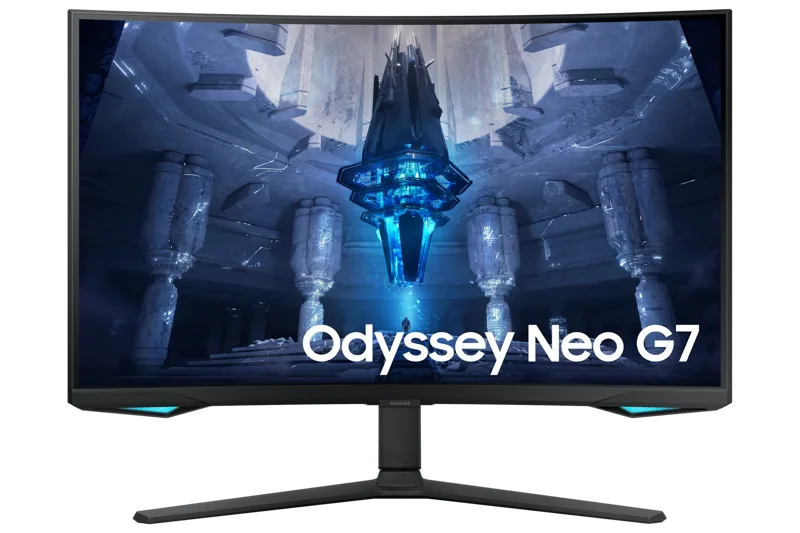
Mini-LED doesn't replace the LCD panel — it replaces the backlight. Instead of a handful of large LEDs (or a single edge-lit strip) illuminating the whole screen uniformly, a Mini-LED backlight packs hundreds of much smaller LEDs into dimming zones that can be switched on, dimmed, or turned off independently. When a scene has a bright object against a dark background, the zones behind the dark area dim or shut off entirely while the zones behind the bright object stay lit. The Samsung Odyssey Neo G7 32" is a good real-world example of this: it pairs a VA panel with a dense Mini-LED backlight to push far deeper blacks and higher peak brightness than a conventional LED-backlit monitor, all while keeping the 165Hz refresh rate and 1000R curve that make it a genuine gaming panel rather than just a contrast showcase.
What OLED does differently
OLED skips the backlight problem entirely by removing the backlight. Each subpixel in an OLED panel emits its own light and can be switched fully off, which means true black is simply a pixel that isn't emitting anything — not a liquid crystal doing its best to block a light source. This is what gives OLED monitors, like the ASUS ROG Swift OLED PG27AQDM, their signature near-infinite contrast ratio and why dark scenes on an OLED panel look genuinely black rather than dark gray. Because there's no backlight to catch up or slow down, OLED pixels also switch states almost instantly, which is part of why OLED has become the preferred panel type for the highest refresh-rate gaming monitors.
Blooming: Mini-LED's visible compromise
Mini-LED's zone-based dimming is an approximation, not a per-pixel solution. A single dimming zone still covers a cluster of pixels, so when a small bright object sits on a mostly dark background — a starfield, a HUD element, subtitles over a dark movie scene — the zone lighting that object can bleed a faint glow into the surrounding dark pixels. This effect, commonly called blooming or haloing, is the most consistent criticism of Mini-LED displays, and it's directly tied to zone count and zone size: more, smaller zones reduce blooming but cost more to manufacture. OLED has no zones and therefore no blooming, because each pixel is independently controlled at the pixel level rather than the zone level.
Burn-in: OLED's trade-off
The flip side is burn-in risk. Because OLED subpixels degrade with usage and static content (a taskbar, a scoreboard, a channel logo left on screen for extended periods) can wear those specific subpixels faster than the rest of the panel, OLED monitors carry a genuine, if often overstated, long-term image retention risk that Mini-LED backlit LCDs simply don't have — an LCD's liquid crystals and LED backlight don't "burn in" the way an OLED's organic compounds can. Manufacturers mitigate this with pixel-shifting, screen-savers, and panel refresh cycles, but it remains the single biggest reason some buyers choose Mini-LED over OLED for setups that involve long stretches of static content, like spreadsheet-heavy office work. Our OLED burn-in deep dive separates the real risk from the panic around it.
Brightness and HDR performance
Mini-LED currently holds a real advantage in sustained peak brightness. Because the backlight is a physical LED array rather than individually emitting organic compounds, Mini-LED panels can push very high nits for extended periods without the heat and degradation concerns that limit how bright OLED panels can run sustained full-screen content. This matters most in bright rooms and for HDR content with large bright areas, where a Mini-LED panel can maintain punch that an OLED panel may dim to protect the panel. OLED still wins on HDR "pop" for small, contrasty highlights against dark backgrounds — explosions, muzzle flashes, starfields — where its per-pixel control creates a sharper contrast edge than any zone-based backlight can match.
Price, lifespan, and where each technology is headed
Mini-LED backlights are, at their core, a manufacturing refinement of a decades-old LCD approach, which means the technology scales down in price more predictably as production matures — Mini-LED monitors have moved from a rare premium feature to a fairly common one across a wide range of price tiers within just a couple of product cycles. OLED panels remain more expensive to manufacture, both because of the organic compounds involved and because of the additional engineering needed to manage brightness and heat without accelerating pixel wear, so OLED monitors still command a real premium over Mini-LED options at a comparable screen size and refresh rate. Panel lifespan follows a similar split: a Mini-LED backlit LCD's expected usable lifespan is governed mostly by the LEDs themselves and tends to be very long under normal use, while an OLED panel's organic subpixels degrade gradually with cumulative on-time regardless of what's displayed, which is a separate and slower process from the static-image burn-in risk discussed above. Neither degradation pattern is likely to be the reason most people replace a monitor, but it's a real difference in how the two technologies age over several years of daily use.
Which one fits your desk
If your day involves long sessions of mostly static content — spreadsheets, code editors, browser tabs with a fixed taskbar — a Mini-LED monitor removes burn-in from the list of things to worry about while still delivering dramatically better contrast than a standard LCD. If your priority is competitive gaming, dark-scene detail, or the sharpest possible motion clarity at high refresh rates, an OLED panel like the PG27AQDM delivers a level of per-pixel contrast and response time that Mini-LED's zone-based approach can't fully replicate, in exchange for accepting some long-term care around static content. Neither is a strictly better technology — they're solving the same contrast problem from opposite directions, and the right choice depends on how you actually use the screen day to day.