Samsung Odyssey Neo G7 32" Review: 4K, 165Hz, and a Curve That Actually Works
8.6/10
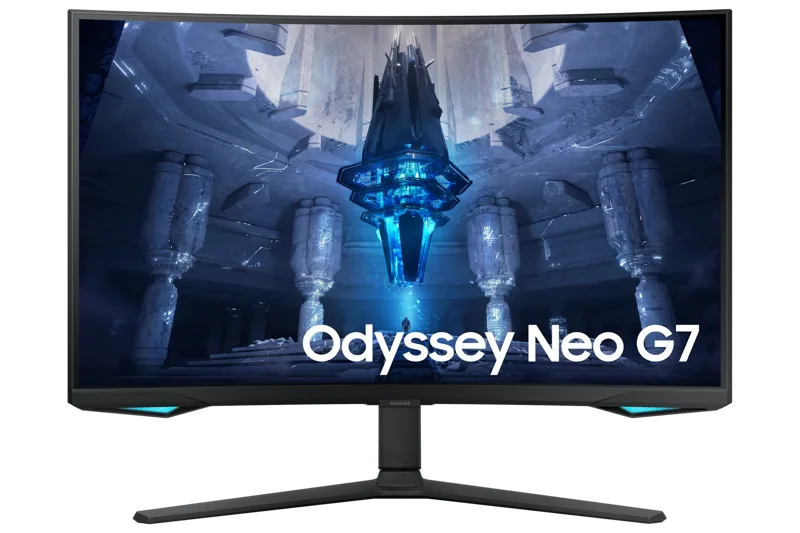
Samsung's Odyssey Neo G7 sits in an unusual spot in the monitor market: it's a 32-inch 4K panel that also runs at 165Hz, wrapped in a 1000R curve and lit from behind by a Mini LED backlight. On paper that combination — sharp, fast, and HDR-capable — reads like a spec sheet built by committee, the kind of monitor that tries to be three things at once and ends up mediocre at all of them. In practice, the LS32BG752NNXGO (Samsung's product code, because nobody asks for it by that) is closer to the rare exception: a display that actually earns its "does everything" pitch, at least for the price it asks.
The panel: VA with a Mini LED backlight
The Neo G7 uses a VA panel rather than IPS or OLED, and that choice shapes everything else about how it looks and feels. VA panels have always had an edge in contrast — deep blacks, punchy image depth — at the cost of viewing angles and, historically, motion clarity. Samsung's Mini LED backlight is the piece that changes the equation. Instead of a handful of large LED zones dimming in blocky steps, the Neo G7 uses hundreds of small zones that can brighten or dim far more precisely, which is what lets Samsung claim 1000 nits of peak HDR brightness without the "blooming" halos that plague cheaper local-dimming monitors.
In mixed content — a dark game scene with a bright HUD element, for instance — that precision is visible. Blooming isn't eliminated entirely (no LCD-based local dimming solution manages that), but it's controlled enough that it stops being distracting during normal use. Against an OLED panel like the ASUS ROG Swift OLED PG27AQDM, the Neo G7 still loses on per-pixel contrast and motion clarity, but it also doesn't carry OLED's burn-in anxiety or the static-HUD warnings that come with it, which matters if this monitor is going to spend half its life running a productivity desktop with the same taskbar in the same spot for eight hours a day.
4K at 165Hz: the number that sells it
3840x2160 resolution at a 165Hz refresh rate is still a relatively rare combination even a few years after this monitor's release, because pushing that many pixels that fast requires serious GPU horsepower — a 4090-class card, realistically, if you want to hit anywhere near 165 frames per second in a demanding modern title at native resolution. That's worth being upfront about: buying this monitor for the refresh rate number alone, without the GPU to feed it, means you'll mostly be looking at a very sharp 4K display running well under its ceiling.
Where the panel earns its keep regardless of GPU is in older or less demanding titles, competitive shooters running at reduced settings, and desktop/productivity work where 165Hz smooths out scrolling and window dragging even without gaming involved. The 1ms GtG response time (Samsung's marketing number, measured under ideal gray-to-gray conditions) translates to genuinely low motion blur in practice, especially paired with the variable refresh rate support — this panel is certified for both NVIDIA G-SYNC Compatible and AMD FreeSync Premium Pro, so it plays fair with either camp's GPUs without a tax for the "wrong" badge.
The 1000R curve: love it or ignore it
At 32 inches, Samsung ships this panel with a fairly aggressive 1000R curve — tighter than the 1800R or 1500R curves common on wider ultrawide monitors. On a display this size, the curve is noticeable but not disorienting; it wraps your peripheral vision slightly at typical desk distances without introducing the fishbowl distortion some ultra-curved panels produce. Whether the curve improves your experience is genuinely subjective and content-dependent: it's more immersive in games and video, and mostly irrelevant — sometimes slightly awkward — for spreadsheet work or code editing, where straight lines near the edges pick up a very mild bend.
Color and everyday use
95% DCI-P3 coverage is a strong number for a gaming-first monitor and puts the Neo G7 within range of doing light photo or video work, though a dedicated color-accurate panel with factory calibration will still out-perform it for anything client-facing. Out of the box, colors lean slightly saturated in the default picture mode, which is typical for VA panels and easy enough to tame in the on-screen menu if you're doing color-sensitive work. For general use — browsing, coding, streaming video, gaming — the color reproduction is more than good enough to not think about.
Stand, ports, and the parts nobody photographs
Samsung includes a height-adjustable stand with tilt and swivel on the Neo G7, and while it's not as fully articulated as some ergonomics-focused office monitors, it covers the basics well enough that most desks won't need a separate arm. The stand's footprint is compact given the panel's curve and size, which matters more than it sounds on a 32-inch monitor — some curved displays need a surprisingly deep desk to sit comfortably, and this one doesn't. Around the back, connectivity covers HDMI 2.1 and DisplayPort 1.4, which is the right call for a panel that can push 4K at high refresh — HDMI 2.0 would have bottlenecked the whole point of buying it. There's no USB-C with power delivery here, which is a mild disappointment on a monitor released after that feature became standard on higher-end competitors; if single-cable laptop charging matters to your workflow, that's worth checking before buying.
Build quality is solid rather than premium — mostly matte plastic with a metal-look stand base — which is consistent with where Samsung positions this monitor in its lineup, below the fully premium Odyssey Ark and Neo G9 models. The on-screen menu, controlled by a small joystick on the underside, is fast to navigate once you learn the layout, with useful presets for HDR, sRGB-locked, and standard gaming modes.
Who should actually buy this
The Neo G7 makes the most sense for someone who wants one monitor to cover both a demanding gaming setup and everyday desktop use, and who has (or plans to have) a GPU capable of pushing real frame rates at 4K. If your primary use case is competitive esports at the highest possible frame rates, a smaller 1440p or 1080p high-refresh panel will serve you better and cost less. For a more color-accurate, flat-panel alternative built for productivity first, the Dell UltraSharp U2723QE is worth comparing directly. If you want the sharpest possible desktop real estate for productivity with gaming as a secondary use, this Mini LED VA panel is one of the more convincing arguments for going curved and 4K at once, rather than settling for a compromise on either resolution or refresh rate.
For more on picking the right panel for a home office setup, see our guide to choosing a monitor for your desk.