The Best Monitors of 2026, By Use Case
There's no single "best monitor" in 2026 — there's a best monitor for what you're actually doing at your desk. A competitive gamer, a color-critical creative, and a productivity-focused office worker have almost nothing in common in terms of what makes a screen good, and buying based on the wrong priority is the single most common regret in monitor shopping. Here's how the current lineup breaks down by real use case.
Best for competitive and high-refresh gaming: ASUS ROG Swift OLED PG27AQDM
At 240Hz with a 0.03ms GtG response time, the PG27AQDM is built for exactly one priority: reacting faster than the monitor next to it. OLED's near-instant pixel response eliminates the motion blur and ghosting that even fast IPS panels still show at high refresh rates, and the panel's true blacks make dark scenes in competitive shooters noticeably easier to read. At $999, it's a serious investment, but for anyone whose desk time is dominated by fast-paced gaming, no other panel technology currently competes on responsiveness.
Best for office productivity: Dell UltraSharp U2723QE
A 60Hz refresh rate is genuinely all a productivity monitor needs, which is why the U2723QE spends its budget elsewhere — a sharp 4K IPS Black panel, a 90W USB-C hub for single-cable laptop charging, and a 2000:1 contrast ratio that makes text and dark UI elements noticeably crisper than a standard IPS panel. For anyone whose day is spreadsheets, documents, browser tabs, and video calls rather than fast motion on screen, this is where the money is best spent rather than on a high refresh rate that would go entirely unused.
Best for color-critical creative work: BenQ PD2725U
Photo editing, video color grading, and any work where color accuracy affects the final output needs a panel calibrated for it, and the PD2725U's 95% P3 and 100% sRGB coverage delivers exactly that at a price well below dedicated studio-grade references. Its Thunderbolt 3 port keeps the single-cable convenience that creative professionals moving between a laptop and a desk setup need, without sacrificing the color fidelity that makes exported work look the same on a client's screen as it did while editing.
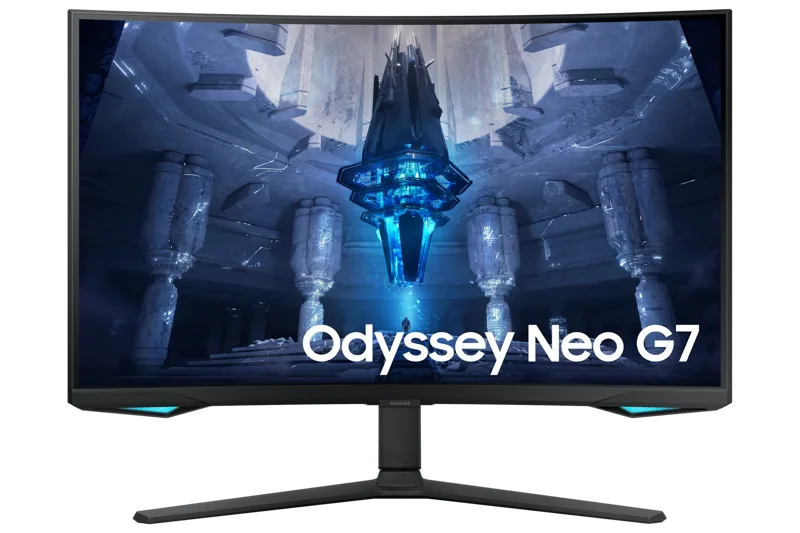
Best for immersive curved gaming: Samsung Odyssey Neo G7 32"
The Neo G7 combines 4K resolution, 165Hz refresh, and a tight 1000R curve into one panel, aimed squarely at gamers who want immersion as much as raw responsiveness. Its Mini LED backlight pushes peak brightness to 1000 nits for genuinely impactful HDR highlights, something OLED panels still can't match on sustained full-screen brightness. It's the pick for anyone who wants a single large, wraparound screen rather than the flatter, smaller profile of a competitive-focused monitor like the PG27AQDM.
Best value QHD gaming monitor: LG 27GP850-B
Not every gaming desk needs 4K or OLED pricing. The LG 27GP850-B's Nano IPS panel at QHD resolution and 165Hz (overclockable to 180Hz) delivers the large majority of the high-refresh gaming experience at a fraction of the PG27AQDM's price, making it the sensible choice for anyone building a first serious gaming setup or upgrading from a 60Hz monitor without wanting to spend flagship money.
How to actually decide between them
Start with how you'll actually use the screen most of the time, not the use case that sounds most exciting. If 80% of your desk time is spreadsheets and browser tabs with occasional casual gaming, the productivity-first Dell delivers more real value than a gaming panel whose refresh rate you'll rarely push to its limit. If competitive response time genuinely affects your results, the extra cost of the OLED panel is money well spent rather than a luxury. Be honest about your primary use case before comparing specs sheets, since the "best" monitor on paper is frequently the wrong one for how a desk actually gets used day to day.
Panel technology matters as much as the use case
OLED delivers the best motion clarity and contrast but carries a real, if now smaller, risk of burn-in under static content, making it a better fit for gaming and media than for all-day spreadsheet work with fixed UI elements. IPS remains the safest all-around choice for mixed productivity and occasional gaming, with no burn-in risk and consistently accurate colors at wide viewing angles. Mini LED VA panels, like the Neo G7, split the difference — strong HDR brightness and deep blacks without OLED's static-image caution, at the cost of narrower viewing angles than IPS.
Adaptive sync compatibility across the lineup
All five panels support some form of variable refresh rate, but the specific standard matters depending on your GPU. The PG27AQDM and LG 27GP850-B are NVIDIA G-SYNC Compatible, the Neo G7 supports both G-SYNC Compatible and AMD FreeSync Premium Pro, and the Dell and BenQ productivity panels include VESA Adaptive-Sync support that eliminates tearing during scrolling and window dragging even without gaming-focused branding. Checking which adaptive sync standard your specific graphics card supports before buying avoids the disappointment of a monitor that technically works but doesn't actually engage variable refresh with your hardware.
The bottom line for 2026
Match the monitor to the majority use case on your desk, not the occasional one. Competitive gamers should prioritize the PG27AQDM's response time, office and hybrid workers get the most value from the U2723QE's hub and contrast, colour-sensitive creatives need the PD2725U's calibration, and anyone wanting one screen that does immersive gaming well without OLED pricing should look at the Neo G7 or the more budget-friendly LG 27GP850-B.
Frequently asked
Is OLED worth the price premium for a mixed-use desk? Only if gaming or media consumption is a significant part of your daily use — for pure productivity work, the burn-in caution and higher price outweigh the motion clarity benefit most office workers won't notice. Do I need 4K for gaming, or is QHD enough? QHD remains the better balance for high-refresh competitive gaming, since driving 4K at 240Hz requires far more GPU power than most systems have, while 4K matters more for slower-paced, visually detailed games and productivity work. How often should a monitor be replaced? A quality panel from any of these categories typically stays relevant for five to seven years before newer technology makes an upgrade genuinely worthwhile rather than just newer.