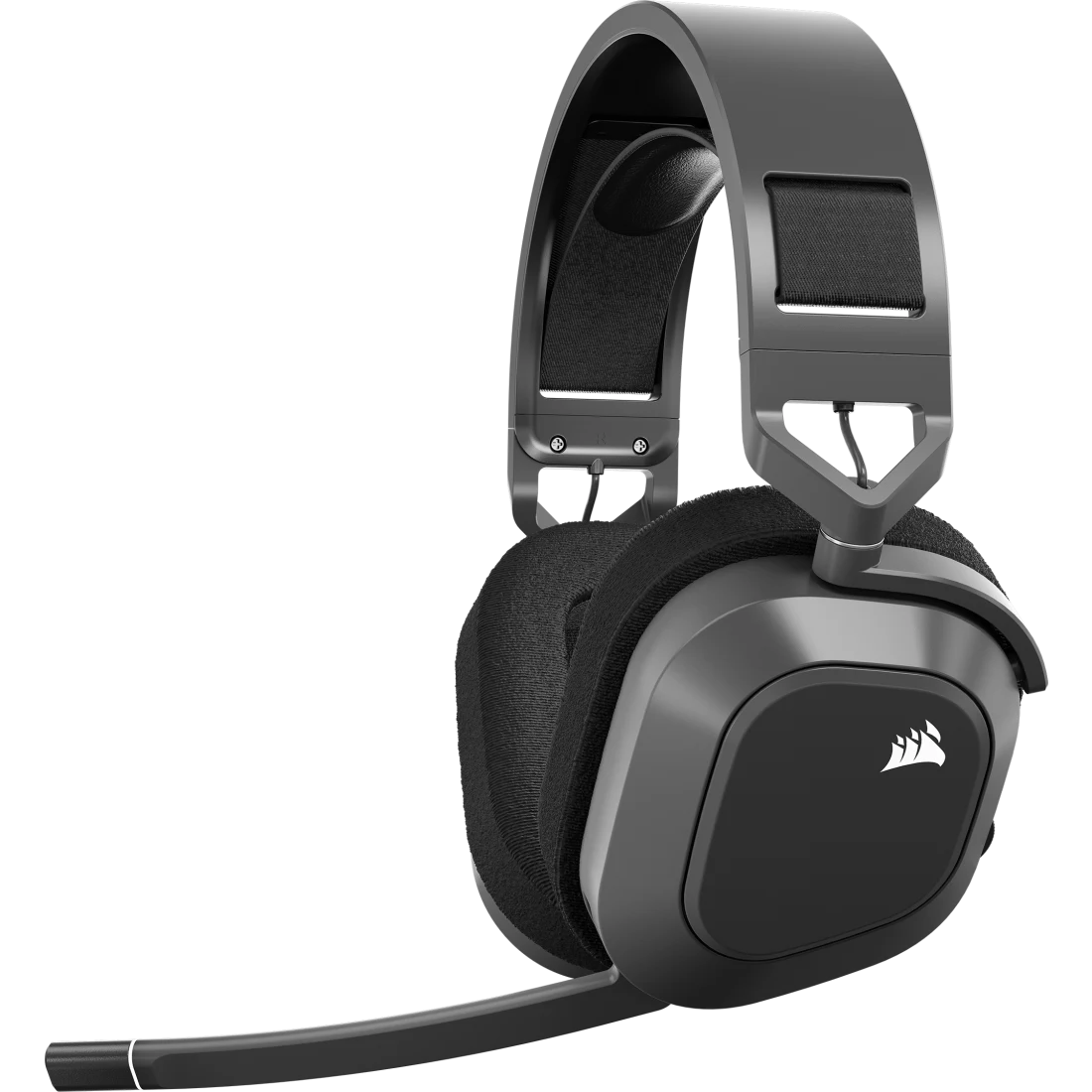
Corsair HS80 MAX Wireless
A wireless gaming headset with 50 mm drivers, 2.4 GHz and Bluetooth, Dolby Atmos, memory-foam pads and up to 65 hours of battery.
Specifications
| Drivers | 50mm neodymium |
|---|---|
| Frequency Response | 20Hz-20kHz |
| Sensitivity | 119dB (+/-3dB) |
| Connectivity | 2.4GHz wireless (USB transmitter) + Bluetooth |
| Wireless Range | Up to 50ft |
| Battery Life | Up to 24h (RGB on), 65h (RGB off), 130h (Bluetooth) |
| Audio | Dolby Atmos, Dolby Audio 7.1 via iCUE |
| Microphone | Omni-directional, fixed, -38dB, 100Hz-10kHz |
| Platforms | PC, Mac, PS4/5, Switch, mobile |
| Software | iCUE (EQ, SoundID, sidetone) |
The Corsair HS80 MAX Wireless is a wireless gaming headset that aims to cover the whole desk: games on a PC or console, music and calls over Bluetooth, and long sessions with comfort in mind. It uses 50 mm drivers, a fixed omni-directional microphone, an aluminum-reinforced frame and a battery rated well into the tens of hours. This page explains what its features mean in daily use, how to get the best from it and which kind of listener it suits.
Two ways to connect, one button to switch
The headset supports both 2.4 GHz wireless and Bluetooth, and you switch between them at the press of a button. The 2.4 GHz link uses the small USB wireless transmitter in the box, and is the mode designed for low-latency game audio. Bluetooth is convenient for a phone or laptop, when you want to take a call or listen to music without touching the transmitter. A practical use: keep the transmitter in your gaming PC for play, and connect your phone over Bluetooth so that a call comes through the same headset without taking it off. The wireless range is stated as up to 50 feet.
The listed platforms are PC, Mac, PlayStation 4 and 5, Nintendo Switch and mobile devices. Different platforms handle the transmitter in slightly different ways, and some features, such as certain software effects, work only on a computer, so read the compatibility notes before you buy if you mainly play on a console. For a wider look at wireless versus wired choices, our headset buying guide is a good companion.
Sound: drivers, tuning and Dolby Atmos
The 50 mm drivers are described as high-density neodymium units. Larger drivers can move more air and tend to give a fuller low end, though driver diameter alone does not determine quality; tuning and the enclosure matter as much. The headset lists a frequency response of 20 Hz to 20 kHz, the classic range of human hearing, and a sensitivity of 119 dB. If you want to understand how driver design relates to what you hear, our news piece on headset drivers and soundstage covers the ideas in plain terms.
Corsair highlights Dolby Atmos spatial audio, which places sounds in a three-dimensional space around you. In games that support it, footsteps or an approaching vehicle can seem to come from a specific direction and height. The iCUE software adds Dolby Audio 7.1 surround, an equalizer and sidetone control. Sidetone feeds a little of your own voice back into the ear cups so that you do not shout unconsciously; it is a small comfort feature that many long-call users appreciate.
Another distinctive feature is Sonarworks SoundID. You run a short personalization inside iCUE, answering questions about how you hear, and the software builds a profile tuned to your preferences. It is not a magic fix, but it is a practical way to tame a sound signature that seems too bright or too heavy. Try it with music you know well.
The microphone
The microphone is omni-directional and fixed to the headset, not detachable. It has a sensitivity of minus 38 dB and a frequency response from 100 Hz to 10 kHz, which is the range that matters for speech. Corsair mentions NVIDIA Broadcast for noise and echo reduction, which is software running on a compatible graphics card. You can flip the boom arm to mute, a simple and quick control that avoids hunting for a button. An omni-directional microphone picks up sound from all directions, which can be forgiving if you move your head, but may also pick up more room noise than a directional one. If you work in a noisy space, position the boom close to the corner of your mouth and use the software noise reduction.
Comfort and build
The ear pads are plush memory foam wrapped in breathable cloth, a choice that generally feels cooler than leather over a long session, though it may pass a little more outside sound. The headband is described as a floating design, meaning the band spreads pressure across the top of your head rather than pressing on one point. The frame is reinforced with aluminum for durability. Comfort is personal, especially if you wear glasses, so if possible try a headset in person, or check the return policy of the shop you buy from. Corsair advertises a 60-day risk-free return period on its own store, according to its listing at the time we looked.
Battery life
The battery figures depend on how you use the headset. Corsair lists up to 24 hours with RGB lighting on, up to 65 hours without RGB, and up to 130 hours over Bluetooth. A quick charge of 15 minutes is stated to give about 6 hours of play. Those are manufacturer figures, so treat them as the best case. The lesson is simple: lighting costs battery, so if you want the longest life, turn RGB off in iCUE. Charging is done with the supplied 1.8 m USB cable.
Software: iCUE
The iCUE app is the control centre. Inside it you can set the equalizer, choose surround modes, adjust the RGB lighting, control sidetone and run the SoundID personalization. If you already own other Corsair products, iCUE can keep them all in one place. If you do not, the software is still optional for basic use; the headset works without it, though you would miss the tuning options.
Price and who it suits
The listed price is 149.99 USD, with the headset offered in Steel Gray and White. Prices at the shop can be lower during promotions, so check the current figure. It suits gamers who play on a PC or console and want a wireless headset with good battery life and flexible tuning, and remote workers who want one headset for both calls and games. It is less suited to people who need a detachable microphone, for example to use the headset as plain headphones on the move, and to those who want a very light headset; the aluminum frame adds solidity but not featherweight comfort.
Within this site, you can compare it with the HyperX Cloud II Wireless, a long-established wireless choice, or with the premium SteelSeries Arctis Nova Pro Wireless. The full range is in the headsets category. And if you are wondering whether a closed or open design suits your room, read our open-back versus closed-back guide.
Setup tips
Update the firmware through iCUE when you first connect, since updates can improve stability. Position the transmitter where it has a clear line of sight to the headset, ideally on the front of the PC or on a short extension, not behind a metal case. Start with the default equalizer, then try SoundID, and make small adjustments. Adjust the headband so that the pads seal comfortably around your ears without pressing hard. Finally, take breaks; even comfortable headsets benefit from being taken off every hour or two.
The short version
The HS80 MAX Wireless offers a well-rounded package: dual wireless modes, spatial audio, personalization, a fixed omni-directional microphone and a long battery life if you keep the lighting off. It is a solid all-round gaming headset for people who want flexibility and comfort on a sensible budget, with the caveat that the microphone is not detachable.