Razer BlackWidow V4 Pro Review: A Mechanical Keyboard Built for Speed
8.9/10
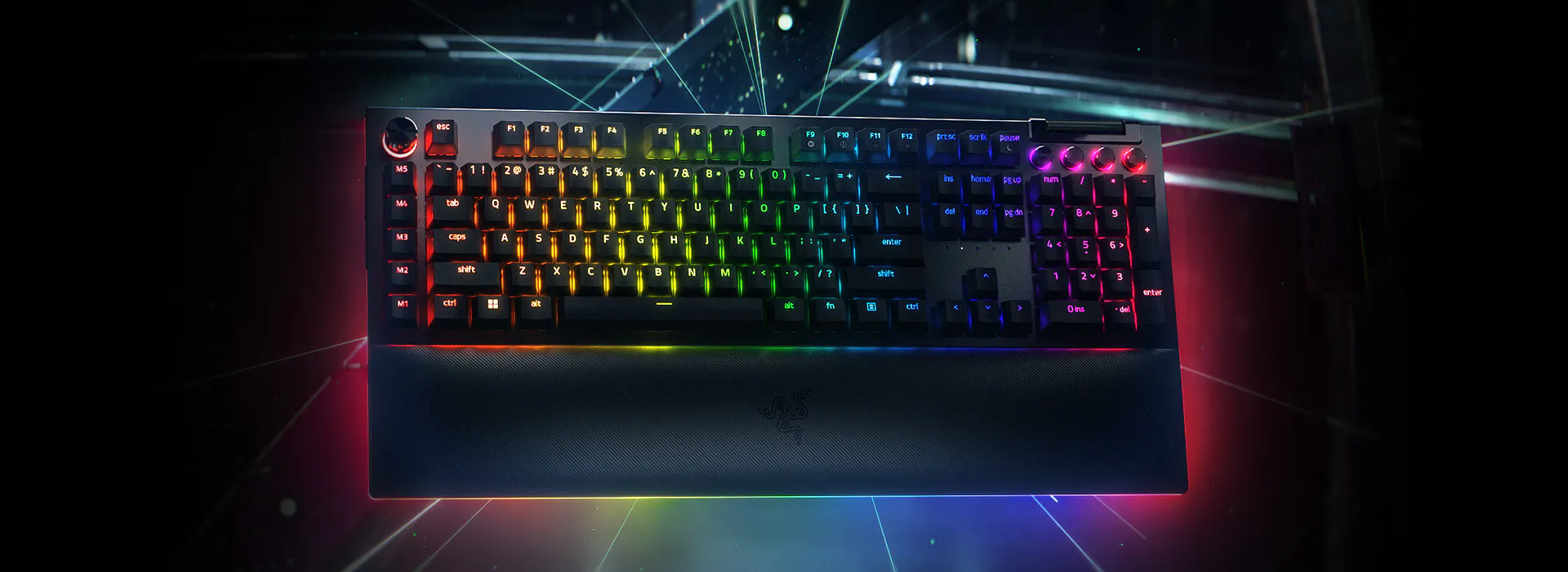
The BlackWidow name has been Razer's flagship mechanical keyboard line for over a decade, and the V4 Pro is the most feature-dense version yet, built around Razer's own Green or Yellow mechanical switches and an unusually high 8000Hz polling rate.
Razer Green switches are clicky and tactile, aimed at typists who want an audible, tactile bump on every keystroke — closer in feel to a traditional Cherry MX Blue than a linear gaming switch. Razer Yellow, offered as an alternative, is linear and light, tuned for rapid actuation in competitive games. Both are hot-swappable on this model via Razer's own socket design, meaning you can experiment with third-party switches later without needing to solder anything, which is a genuinely useful bit of future-proofing that wasn't present on earlier BlackWidow generations.
The 8000Hz Hyperpolling rate is the headline gaming spec — most keyboards and mice still poll at 1000Hz, and Razer's push toward 8000Hz (matched on their DeathAdder V3 mouse) reduces the theoretical input-to-registration latency substantially. In blind testing this is a genuinely difficult difference to perceive in isolation, but paired with a similarly high-polling mouse, competitive players report a cumulative sense of the whole input chain feeling tighter.
Where the V4 Pro distinguishes itself from most mechanical keyboards, gaming or otherwise, is its control surface: a physical Command Dial for quick volume or macro-layer adjustment, four dedicated media keys, and eight total macro-assignable controls once you count the dial and side buttons. Razer Chroma RGB lighting extends beyond the keycaps onto twenty extra zones built into the included magnetic wrist rest, which is a nice touch for anyone who wants their setup to visually match other Chroma-enabled peripherals.
Build quality and typing feel
An aluminum top plate gives the chassis a noticeably more rigid, higher-end feel than the injection-molded plastic frames common on cheaper mechanical boards. Combined with doubleshot PBT keycaps (which resist the shine and wear that cheaper ABS keycaps develop within months), this is a keyboard that should hold up cosmetically for years of daily use.
Mechanical vs. membrane: does it matter for you?
If you're coming from a membrane keyboard like Logitech's G15 Gaming Keyboard, the jump to a mechanical switch — any mechanical switch — is usually the single biggest tactile upgrade available in a keyboard purchase, more noticeable day to day than most other spec differences. We cover that trade-off in more depth in our mechanical vs. membrane buying guide.
Verdict
The BlackWidow V4 Pro is a genuinely premium mechanical keyboard aimed at players and typists who want hot-swappable switches, extensive on-board macro control, and an unusually high polling rate, wrapped in build quality that matches the price. It's a top pick in our keyboard lineup for anyone not on a tight budget.
Software and customization depth
Razer Synapse handles all deep customization on this keyboard: per-key RGB assignment across the Chroma zones (including the twenty extra zones on the wrist rest), macro recording with adjustable playback timing, and full remapping of every key including the Command Dial's rotation and click behaviors. Profiles can be stored directly onboard the keyboard's own memory, so custom lighting and macros travel with the keyboard to a second PC without needing Synapse installed there, though full configuration still requires Synapse on at least one machine to set up initially.
Hot-swap sockets: a genuinely practical inclusion
The hot-swappable switch sockets deserve more attention than they usually get in keyboard reviews, because they change the calculus of buying a mechanical keyboard at all: rather than being permanently committed to Razer Green or Yellow switches, the board accepts most standard 5-pin mechanical switches from third-party manufacturers. That means if, after a few months, you decide you'd prefer a quieter tactile switch for an open office, or a heavier spring weight for a different typing feel, you can swap individual switches or the entire set without any soldering, essentially turning one keyboard purchase into a platform you can keep adjusting over years rather than a single fixed decision.
Noise and workplace suitability
Worth flagging directly: Razer Green switches are genuinely loud, among the loudest common mechanical switch types, comparable to a manual typewriter in an otherwise quiet room. This is a wonderful, satisfying feel for solo late-night gaming or a private home office, but a poor choice for open-plan offices or shared living spaces without headphones on the people around you. Razer Yellow linear switches, sold as an alternative build of this same keyboard, are considerably quieter and worth choosing instead if workplace noise is a real constraint, without giving up the hot-swap flexibility, macro controls, or build quality that define this keyboard.
Value against the broader mechanical keyboard market
At its price point, the BlackWidow V4 Pro competes with mechanical keyboards from Corsair, SteelSeries, and boutique keyboard brands, and its main differentiators are the unusually high 8000Hz polling rate (a genuine, if modest, latency advantage for competitive gaming), the physical Command Dial (a feature few competitors match), and Razer's aluminum-plate build quality. Buyers who don't need 8000Hz polling or a dial control and who primarily want a great typing feel can find comparable core mechanical switch quality for less money elsewhere in Razer's own lineup or from competitors — this model earns its premium through its extra control surface and hot-swap flexibility more than through the switches alone.
Frequently asked
Can the Command Dial be remapped to something other than volume? Yes, through Razer Synapse the dial's rotation and click can be assigned to nearly any function, including scrolling, zoom, or application-specific macros, not just the default volume control. Is this keyboard compatible with Mac systems? The keyboard functions as a standard USB HID keyboard on macOS for basic typing, but Razer Synapse and the full customization suite are Windows-only, so advanced features like macro programming and per-key lighting require a Windows machine to configure. How loud is "genuinely loud" in practice — is it office-appropriate at all? With Razer Green switches specifically, most users find it too loud for an open-plan office without headphones on nearby colleagues; the Yellow linear switch variant is meaningfully quieter and a more reasonable choice for shared workspaces.