Logitech G15 Gaming Keyboard (2nd Gen) Review: A Relic With a Screen
6.8/10
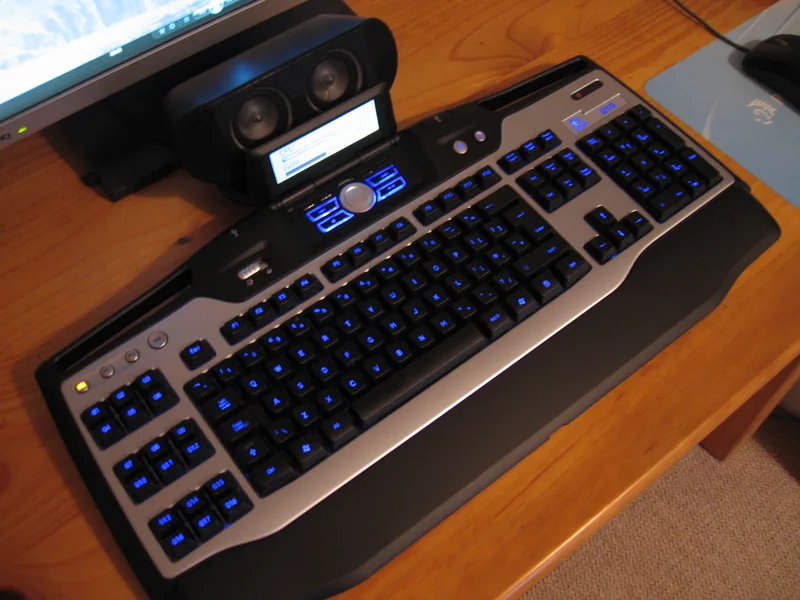
The Logitech G15 occupies a strange position in 2026: it's a membrane keyboard from an era when membrane was still the default for gaming keyboards, built around a feature — a built-in LCD panel — that most of the industry has since abandoned. Revisiting the 2nd Gen G15 today means asking two separate questions. Is it still a good keyboard on its own terms? And does that LCD panel, the thing that made it distinctive, still hold up as a useful idea?
The GamePanel LCD: a feature ahead of its infrastructure
The defining feature of the G15 is its 160x43 pixel monochrome LCD screen embedded above the function row, paired with a row of dedicated buttons to navigate it. Logitech's idea, back when this generation launched, was that game developers and Logitech itself would build "applets" for the screen — showing your ammo count, Ventrilo/TeamSpeak status, system stats like CPU temperature, or media controls without needing to alt-tab out of a full-screen game. In practice, that ecosystem never grew as large as Logitech hoped, and by the 2nd Gen revision the screen had already shifted from a fully custom display to what the specs describe as "fixed" — a narrower, more curated set of built-in applets rather than an open platform third parties actively built for.
Today, the panel's most reliable use is showing system stats (CPU/RAM usage), the time, and media playback controls — genuinely handy for a glance without leaving a game, but a long way from the multi-purpose HUD Logitech originally pitched. It's worth buying this keyboard for that screen only if you have modest, realistic expectations about what it does: a small, useful convenience, not a second monitor.
Typing feel: membrane done well
Setting the LCD aside, the G15 is a competently built membrane keyboard. Membrane switches use a rubber dome under each key rather than the individual mechanical switch assemblies found in higher-end gaming keyboards, and the tradeoffs are well understood: membrane is quieter, cheaper to manufacture, and generally mushier in feel, with less precise actuation than a mechanical switch. For fast-twitch competitive gaming, that mushiness can theoretically cost you milliseconds of response time compared to a keyboard like Razer's BlackWidow V4 Pro, which uses genuine mechanical switches built for speed.
For everyday typing and less frame-perfect gaming, though, the G15's membrane switches feel perfectly reasonable — soft, quiet, and comfortable over long sessions in a way some mechanical switches (particularly clicky varieties) aren't. This is a keyboard that prioritizes not annoying your household over shaving milliseconds off your reaction time, which is a legitimate choice for a lot of buyers, even if it's the opposite priority from what most gaming keyboard marketing pushes today.
Macro keys and backlighting
Six dedicated G-keys sit to the left of the main keyboard, each supporting three separate macro profiles for a total of 18 programmable macro slots — a genuinely useful number for MMO players, streamers triggering overlay actions, or anyone who wants one-touch access to complex key sequences. The orange backlighting is fixed to a single color rather than the RGB spectrum now standard even on budget keyboards, which will read as dated to anyone shopping in 2026, though the backlight itself is bright and evenly distributed with adjustable brightness levels.
Two built-in USB 1.1 passthrough ports round out the connectivity, letting you plug a mouse or USB drive directly into the keyboard rather than reaching around to the back of a PC — a small ergonomic convenience that's become less common as keyboards have generally shed extra ports to cut costs.
Software and driver support in 2026
Programming the G-keys and the LCD panel's applets requires Logitech's Gaming Software or its successor, G HUB, and this is where the G15's age shows most clearly. As a legacy peripheral, it isn't a priority for Logitech's ongoing driver development, and users have reported inconsistent compatibility with newer versions of G HUB on current Windows builds — sometimes requiring a rollback to the older Logitech Gaming Software (LGS) client to get full macro and LCD functionality working reliably. That's a real practical hurdle for anyone buying this keyboard today expecting plug-and-play macro programming; budget some time for driver troubleshooting, particularly on a fresh Windows install where LGS isn't already present.
This software uncertainty is the single biggest asterisk on an otherwise straightforward recommendation. A current mechanical keyboard from Logitech's own newer lineup, or from a competitor still actively maintaining drivers, removes that risk entirely — worth weighing against whatever nostalgia or budget appeal draws you to the G15 specifically.
Build quality and desk footprint
The chassis is mostly matte black plastic with a slight palm-rest lip built into the bottom edge rather than a separate detachable wrist rest — a design choice that keeps the keyboard's footprint compact but offers less cushioning than keyboards shipping with a dedicated gel or foam rest. At roughly full-size width plus the extra real estate the G-keys and LCD panel need, the G15 sits noticeably wider on a desk than a tenkeyless or compact keyboard, which is worth factoring in for smaller desk setups increasingly common with dual-monitor or docking-station-heavy configurations.
Should you actually buy this in 2026?
The honest answer depends heavily on what's driving the purchase. As a primary gaming keyboard bought new at full price, the G15 is hard to recommend over current mechanical options that cost similarly or only slightly more and deliver meaningfully better switch feel and RGB lighting — the BlackWidow V4 Pro being the clearest example in this site's own catalog. As a budget secondary keyboard, a nostalgia purchase, or a genuinely cheap way to get a usable macro pad with a novelty LCD screen, it still does its job. The GamePanel LCD is a fun relic of a road the gaming peripheral industry mostly didn't take, and if that appeals to you specifically, it's worth the low asking price on the secondhand market where most of these now live — just go in expecting a bit of driver friction, and treat the LCD as a charming extra rather than the reason to buy.